enV Touch: A Different Spin on Touch Screen Phones
Touch mania is spreading across the mobile phone world, but in a sea of phones clamoring to catch the touchscreen wave, the enV Touch might seem at first to be a mere wannabe lost behind its more recognizable competitors. But, with unique tricks up its sleeve and a good price tag, the enV Touch proves it is different, not just more of the same.
 |
|
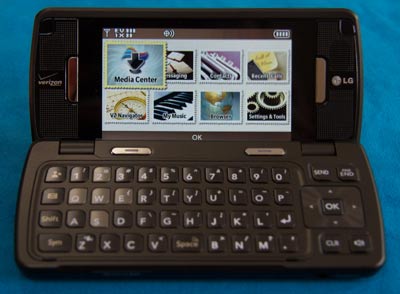
Open as a clamshell, the enV Touch looks like a miniature laptop. Note the clean, unique interface. |
The enV Touch is a unique and well thought out device. In many ways, it fuses the two most popular higher end phone form factors together. On the one hand, you have the distinctly modern pleasure of using a touchscreen to control the phone. Conversely, when flipped open, the phone is a clamshell phone with full keyboard rather like its enV siblings.
The clamshell mode is thoughtfully designed with a hinge that has several different locations that lock. When it is first opens it clicks to a lock at an angle similar to how one might position a laptop's screen — perfect for when the phone is sitting on a desk or table. However, for using the keyboard while holding the phone, it is also possible to have the keyboard lock further back at 180 degrees, creating an essentially flat phone. This was an extremely useable position for many tasks.
This switching between touch screen “candy bar” phone and clamshell can be slightly jarring. I found myself sometimes touching the screen in clamshell mode only to realize that the interior screen wasn't touch sensitive. But, that aside, the interior screen was bright and beautiful — and the keys were a pleasure to use. A four way directional pad served to handle navigation in that mode.
Voice calling was clear and relatively natural sounding. We found it slightly more “digital” sounding than other phones in a test grouping, but the difference was minute and probably imperceptible during normal usage. Reception was excellent in almost every place the phone was tested, both rural and urban.
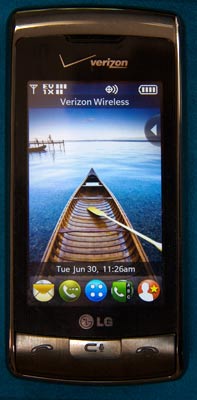
For basic web browsing, phone calling and the like, the touch screen mode was definitely preferable. While comparisons with the iPhone are inevitable, LG went out of its way to do things not only well, but differently. From the unlock gesture, which involves pulling up a “shade” that dims the contents of the screen, to the postage stamps that form the menu of options, the enV Touch takes its own, distinct path on the road of touch screen phone interfaces, particularly as compared to the iPhone and Palm Pre.
The phone's touch screen is resistive in design, which primarily translates into a required heavier touch against the screen as compared to the current batch of capacitive touchscreen phones (e.g. the iPhone, Blackberry Storm and Palm Pre). This and a somewhat weak sensitivity beyond that made it so that sometimes multiple taps were necessary to properly move about the interface. However, as I became more use to the phone's screen, I found I naturally pressed at a level that was more effective.
Generally, it worked well enough and anyone who uses the enV Touch exclusively for awhile will probably find the difference even less apparent — the hardest part is switching frequently between capacitive and resistive touch screens. The only real exception to the interface's general responsiveness was the on-screen keyboard. With the lower sensitivity of the screen and lack of sophisticated auto correction, it was somewhat difficult to use it effectively. On the other hand, most people will likely switch to the clamshell mode, with its handy mechanical keyboard, whenever significant keyboard time is necessary anyway.
The resistive screen does offer one interesting benefit: stylus compatibility. While styluses have generally fallen out of favor as input devices — most touchscreens, including the enV Touch's, now focus on direct touch from one's fingers — it is possible to use one with the enV Touch. Thanks to this, in addition to the mechanical and on-screen soft keyboards, the enV has a capable handwriting recognition method that seems somewhat reminiscent of Palm's Graffiti.
 |
|
The home screen of enV Touch in touch screen mode. |
For long conversations, I appreciated the enV Touch's speakerphone in the clamshell mode. Speakers are positioned on both sides of the screen, so having the phone sitting on the desk open produced really loud, clear speakerphone conversations. If anything, the speakerphone could be almost too loud, which is a much better problem to have than the typical situation where the speakers are too quiet.
The web browser was impressively capable for a feature phone. It may not be as sophisticated as what one will find on a smart phone, but it made surfing common web sites easy enough. It was also relatively fast. In a stress test in which we pitted the enV Touch against an iPhone 3GS and Sony Ericsson W760a, the Touch handled itself capably, typically taking — at worst — a couple seconds longer than the iPhone and soundly trouncing the more standard feature phone.
Like the Samsung Alias 2 that we looked at earlier this summer, the enV Touch supports major Verizon initiatives such as VZMusic and VZNavigator. VZNavigator was well suited to the phone, working nicely in either touch screen or clamshell modes. When using the touchscreen, the built in accelerometer made it easy to rotate the phone to find the best orientation for viewing the maps.
When using VZNavigator's turn-by-turn directions with the phone vocalizing the directions, leaving the phone open in clamshell mode worked best, thanks to the unobstructed speakers which were happy to loudly proclaim what it was I needed to do (or what turn I had missed, as the case may be).
At $99, this feature phone's upfront cost seems a bit high: it is right at the same price point as the iPhone 3G 8GB, a smart phone backed with the flexibility of the iTunes App Store. The Blackberry Storm, which also calls Verizon home, is similarly positioned right at one Benjamin. But, the enV Touch — as a “mere” feature phone — has a significant advantage: a lower monthly fee. Over the course of a two year contract, the enV Touch without a data plan is $720 cheaper than the iPhone. Of course, most folks buying a sophisticated, touch screen phone probably want some data, and the $15/month unlimited plan for the enV still places it $310 cheaper over two years than Apple's low-end entry.
Even if you throw in Visual Voicemail (which is optional on the enV, unlike the iPhone), the enV remains $288.24 cheaper. Similar numbers could be crunched when discussing the Blackberry Storm, which actually ends up the most expensive, costing $360 more than the enV Touch with data plans and visual voicemail enabled on each.
Does that mean the enV is better than the iPhone or Blackberry? No, not necessarily. But, it helps to put the phone's true market position into perspective. Should a phone that costs $819 over two years (iPhone 3G) have more functionality than one costing $530 (enV Touch)? Absolutely, and it does. But for many users, the enV touch will capably handle all they need and for a lot less cash — especially given that it features the most impressive web browser we've tested on a non-smartphone.
So, can we recommend the enV Touch? Yes; while those looking for a smartphone will find this phone somewhat limited, those in a position to trade up from a RAZR or other basic phone into a phone with excellent internet connectivity, large screens, a real keyboard and clear speakerphone will find this unit a major upgrade. With very good reception and sturdy construction, this phone will serve most anybody's communications needs with aplomb (LG/Verizon Wireless, www.vzw.com, $99 with 2-year contract).
Join the Conversation
Re: enV Touch: A Different Spin on Touch Screen Phones
Good review. You hit on the reason I recently purchased the phone, and that is lower long term cost. VZ customers should note that if they get this phone and want data, it is less expensive to go with a “Connect” plan than it is paying the extra $15/mth for a data pack. Sidenote: Current Blackberry Storm’s screen is not capacitive.